


 08039845684 ||
  +2348039845684
How To Use Computer To Write JAMB 2022 (Free CBT Training)
Are you scared of JAMB CBT exam because you don’t really know how to use computer to write JAMB?
You will see the simple step on how to write JAMB using a computer mouse or keyboard even when you are not good with computers at all.
Take note.
JAMB exam is completely CBT — Computer Based Test.
This means that all your JAMB questions will be asked and answered using a computer.
So you have to know how to use computer to write JAMB especially if this is your first JAMB or your computer skill level is low
Can you write JAMB without computer training?
The answer is YES.
You do NOT need computer training on Desktop Publishing, Graphics Design, Microsoft Word or CorelDraw for JAMB.
If you need any “computer training” at all, it is only to know how to write JAMB using a computer mouse and keyboard.
Nothing else.
JAMB exam is completely CBT — Computer Based Test.
This means that all your JAMB questions will be asked and answered using a computer.
So you have to know how to use computer to write JAMB especially if this is your first JAMB or your computer skill level is low.
So if you can TYPE on a computer and move the CURSOR on the screen, then you are good to go.
But if you don’t know how to use computers at all or maybe you have not even seen a computer before, then this guide is more for you.
How to use computer to write JAMB
Once again.
You only need the basic knowledge of the mouse and keyboard for JAMB exam.
These two computer parts and how to use them in your JAMB is what will be discussed in detail below.
What is a Keyboard?
The keyboard is that part of the computer that contains letter A—Z, number 0—9 and other symbols.
It is the same for both Desktop and Laptop and you do not even need to know much about it either

Just know the JAMB CBT function of each of the the 9 keys highlighted in the keyboard image above.
How to use keyboard in JAMB
This is almost the simplest method on how to use computer to write JAMB because it involves using just 9 keys (A, B, C, D, N, P, S, R, Y) on the keyboard.
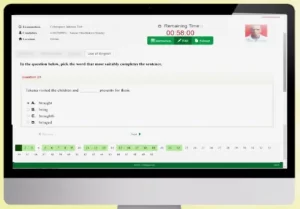
Here’s an example of how your JAMB questions will probably look like on the computer screen.
How To Use Computer To Write JAMB 2021 (Free CBT Training)
Are you scared of JAMB CBT exam because you don’t really know how to use computer to write JAMB?
In this guide,
You will see the simple step on how to write JAMB using a computer mouse or keyboard even when you are not good with computers at all.
ALSO SEE: How To Pass JAMB Without Studying Hard or Cheating
Take note.
JAMB exam is completely CBT — Computer Based Test.
This means that all your JAMB questions will be asked and answered using a computer.
So you have to know how to use computer to write JAMB especially if this is your first JAMB or your computer skill level is low.
Can you write JAMB without computer training?
The answer is YES.
You do NOT need computer training on Desktop Publishing, Graphics Design, Microsoft Word or CorelDraw for JAMB.
If you need any “computer training” at all, it is only to know how to write JAMB using a computer mouse and keyboard.
Nothing else.
So if you can TYPE on a computer and move the CURSOR on the screen, then you are good to go.
But if you don’t know how to use computers at all or maybe you have not even seen a computer before, then this guide is more for you.
How to use computer to write JAMB
Once again.
You only need the basic knowledge of the mouse and keyboard for JAMB exam.
These two computer parts and how to use them in your JAMB is what will be discussed in detail below.
What is a Keyboard?
The keyboard is that part of the computer that contains letter A—Z, number 0—9 and other symbols.
It is the same for both Desktop and Laptop and you do not even need to know much about it either.

Just know the JAMB CBT function of each of the the 9 keys highlighted in the keyboard image above.
How to use keyboard in JAMB
This is almost the simplest method on how to use computer to write JAMB because it involves using just 9 keys (A, B, C, D, N, P, S, R, Y) on the keyboard.
Let’s see how.
Here’s an example of how your JAMB questions will probably look like on the computer screen.

Now how can you use the 9 keys to answer JAMB questions?
- Press “A” if you want to choose option A as your answer.
- Press “B” if you want to choose option B as your answer.
- Press “C” if you want to choose option C as your answer.
- Press “D” if you want to choose option D as your answer.
After choosing the option that you think is the correct answer for that question,
- Press “N” to go to the Next question.
- Press “P” to go back to the Previous question.
When you have answered all the questions in your four subjects,
- Press “S” to Submit your exam.
The computer will pop up a question on the screen asking if you really want to submit.
- Press “Y” to say YES and confirm your submission.
- Press “R” to Return to the questions without submitting.
Take note.
Once you press Y after pressing S, your submission will be confirmed and there is NO GOING BACK.
Make sure that you have finished all the questions in your four subjects before submitting.
What about the mouse?
The mouse is used to move the cursor and select items on the computer screen.
The cursor is a small arrow on your computer screen that moves with the mouse and points at items on the computer screen.
On a Desktop computer — the mouse is that device that looks like a “rat”.

- Place the palm of your right/left hand on the mouse.
- Move the mouse around to move the cursor on the screen.
- Left-click the mouse to select the item that the cursor is pointing at.
On a Laptop computer — the mouse is flat and located just below the keyboard.

- Place a finger of your left/right hand on the Touchpad.
- Move your finger around on the Touchpad to move the cursor on screen.
- Tap the Touchpad or Click the left button to select the item that the cursor is pointing at.
How to use mouse in JAMB
This method on how to write JAMB using a computer mouse is not as simple as that of the keyboard but still effective
Leave a Reply